No Source Template for Your Legacy ERP? How to Move Any Source to Oracle Fusion
Author:
Amarpal Nanda & Iswarya Tamilmani
Quick Summary
Prebuilt templates speed up Oracle Fusion migrations for known sources. Homegrown and heavily customized systems are harder to map. This article follows five steps: Assess, Remediate, Migrate, Reconcile, and Cut Over. It shows how Smart Data Platform combines AI-assisted mapping, Fusion loaders, validation, and reconciliation while your team approves business decisions.
Why Unknown Sources Are Hard to Map
A template for Oracle E-Business Suite (EBS), SAP, or JD Edwards knows its standard customers, suppliers, and invoices. It brings tested mappings and checks. ChainSys says this can provide 70 to 80% of mapping on day one.
In a custom source, field names may be cryptic, codes undocumented, and relationships hidden in application logic. Someone must establish each field's meaning before mapping it to Fusion.
Why “No Template” Is More Common Than You Think
Homegrown applications: Older databases such as DB2, Sybase, or Microsoft Access may hold rules in code rather than documents.
Rare or regional ERPs: A small user base may mean no ready-made migration content.
Customized ERPs: An EBS or JD Edwards instance can have years of custom tables, fields, and connected apps.
Acquisitions: Several versions of the same system may use different codes and rules.
In each case, the source does not match what a standard template expects. That leads to the real question: when no template recognizes your source, how do you still migrate it with speed and confidence?
How Teams Handle It Today
Without a template, most teams answer that question by hand. The work tends to unfold in the same order.
First, they dig. With little documentation, a field such as ATTR_07 can take days to explain.
What they find goes into spreadsheets. As mapping spreadsheets multiply, it becomes harder to tell which one is current.
Test loads expose more gaps. Fusion rejects records that fail its requirements; the team fixes a field or relationship and runs another cycle.
Finally, finance asks for proof. Sampling cannot confirm every expected record and relationship. The team needs repeatable checks.
None of this means the project is failing. It means the method has to fit the source. And that starts with seeing where the gap really sits.
The Good News: You Still Have a Template for Your Target
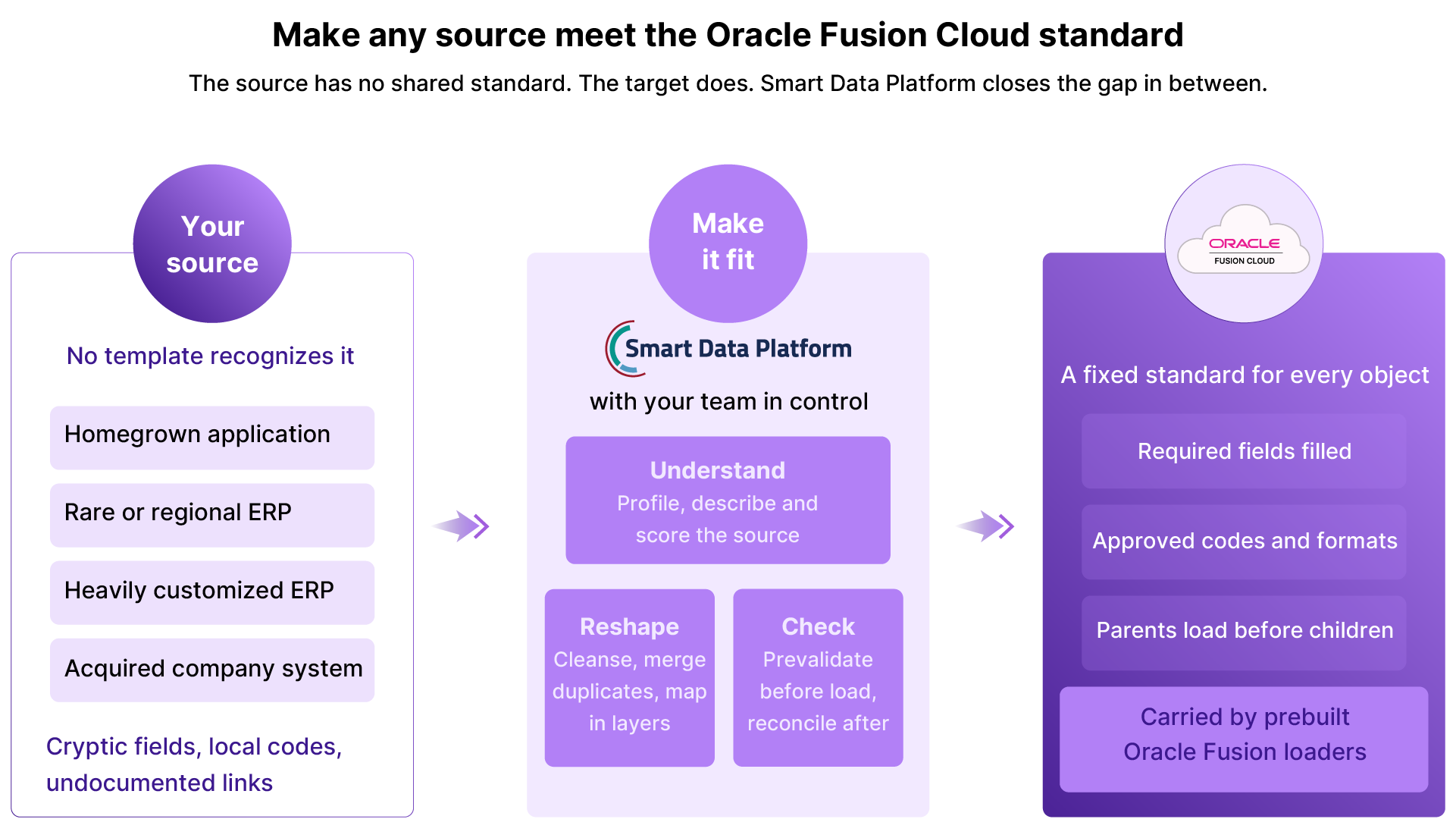
Here is the part that often gets missed. An unknown source has no standard. Oracle Fusion Cloud does.
Every Oracle Fusion Cloud object, such as a supplier, item, customer, sales order or journal, expects data in a set shape. Certain fields must be filled. Values must follow set formats and match approved codes. Records must load in a set order, parents before children. These rules stay the same no matter where the data comes from.
With no template for the source, you start from the target. You take the standards Oracle Fusion Cloud already sets and bring your source data up to meet them.
ChainSys prebuilt Oracle Fusion loaders already carry those standards, with transformations and prevalidations built around what Oracle Fusion Cloud expects. So the work comes down to three things: understand the source, reshape it to fit, and check it against those rules before it loads.
No template for your source? Start from the target.
A Five-Step Method That Works for Any Source
The first four steps repeat in test cycles until the results are clean. The fifth step runs the same proven flow one final time in production.
Step 1. Assess: Know What You Have Before You Move It
Profile the source before mapping it.
Connect. Smart Data Platform works with applications, databases, files, and web services. Its on-premise agent can execute tasks locally while sending only run details, such as counts and timings, to ChainSys cloud.
Explain. AI drafts business descriptions for tables and fields; a steward reviews them.
Find links. AI suggests relationships the database may not enforce.
Find sensitive data. Flag personally identifiable information (PII) early.
Measure quality. Check completeness, validity, uniqueness, and accuracy.
For slow queries, the AI Query Optimizer proposes and compares changes. A user chooses whether to apply them.
Step 2. Remediate: Fix It Before Oracle Fusion Sees It
Resolve problems before loading.
Cleanse inconsistent values, formats, and addresses.
Match and merge duplicates; a steward confirms AI survivorship suggestions.
Preserve links. When “ABC Corp” merges into “ABC Corporation,” cross-references keep its old purchase orders tied to the surviving record.
Test rules on sample data before applying them to the full population.
Step 3. Migrate: Map Smart, Load in the Right Order
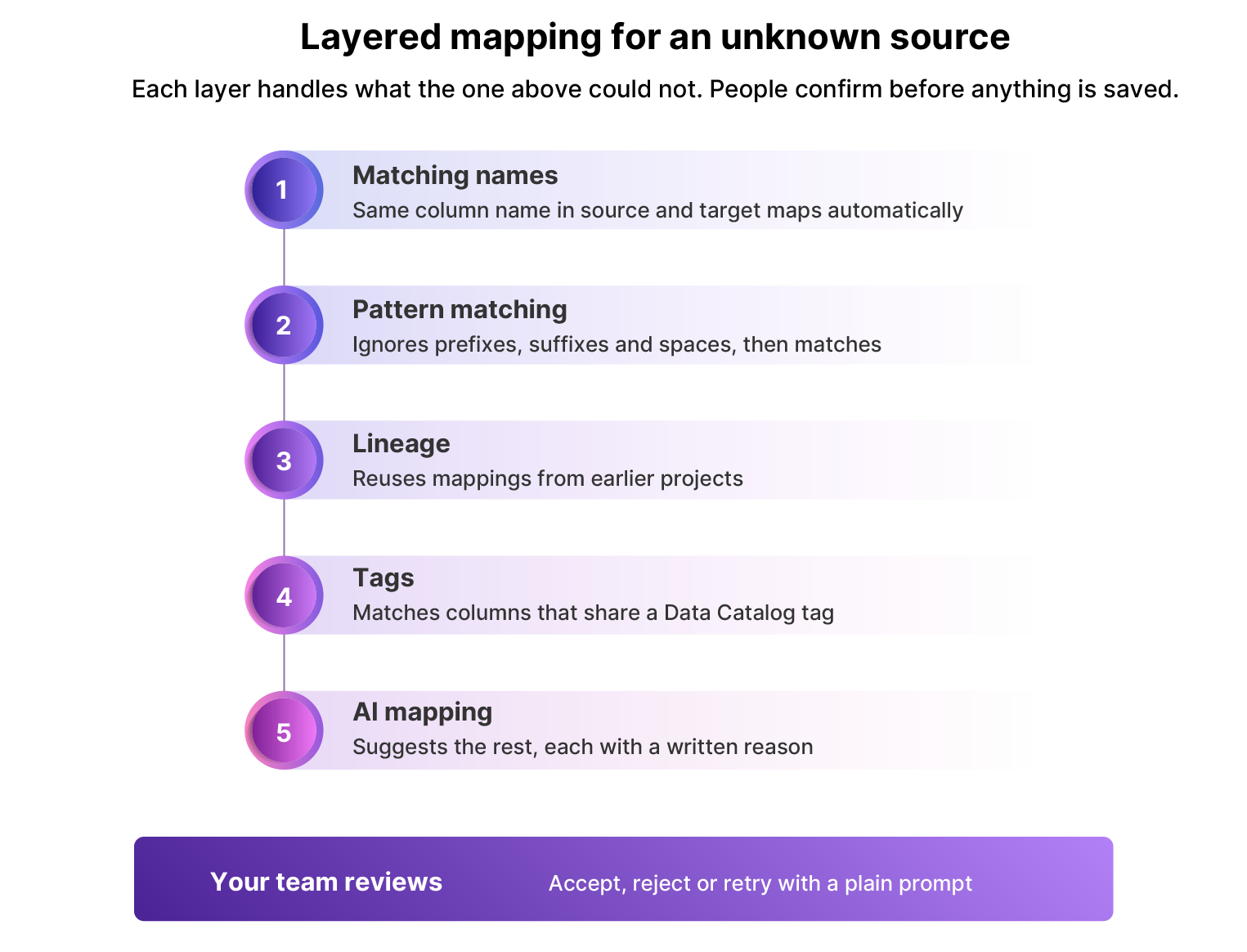
The Mapper leaves uncertain matches for review.
Matching names: Map identical source and target columns.
Pattern matching: Ignore prefixes, suffixes, or spaces, so s_ORDER_NO matches ORDER_NO and “Sales Order No” matches SALES_ORDER_NO.
Lineage: Reuse prior mappings, such as Item_Name to Product_Name; a person chooses when several matches exist.
Tags: Match columns with the same Data Catalog tag.
AI mapping: Suggest all or remaining matches. Review written reasons, reject errors, or retry with “Ignore the _Custom suffix” or “Treat camelCase and snake_case alike.”
Map the rest manually. Then prepare the load:
Prevalidation reports errors before records reach Fusion for batch correction.
Auto-orchestration follows dependencies in prebuilt template hierarchies. Items precede price lists; customers precede orders. Custom flows need their dependencies defined.
Step 4. Reconcile: Prove Every Record Landed
A completed import needs verification.
Check twice. Compare raw and transformed data before loading, then transformed and accepted target data afterward.
Read back from Fusion. Use Oracle reports where direct database queries are unavailable.
Investigate gaps. The Comparator separates records found only in the source, only in the target, or in both, and compares shared values.
Retain the trail. Plain-language logs show actions and differences.
If results differ, correct the data or rule and repeat the check.
Step 5. Cut Over: Go Live on a Tested Plan
At cutover, the old system stops taking new work and users begin in Fusion. Plan a source freeze, catch-up load, and sign-off.
Promote tested work. Sprints separate DEV, TEST, UAT, and production; reuse the flow.
Load changes. Delta extraction handles new or changed source records. The Comparator can feed records missing from the target into a configured load.
Pause for approval. A run can stop after validation while approvers review it.
Watch the window. Run-time estimates and alerts flag delays.
The business still makes the go or no-go decision.
Where AI Helps, and Where People Decide
AI suggests descriptions, relationships, mappings, and query improvements. People verify meaning: stewards confirm merges, reviewers reject incorrect matches, and owners approve loads.
Pain Points and How Smart Data Platform Addresses Them
Pain point
What Smart Data Platform does
Step
Legacy fields are unclear
Drafts descriptions for steward review
Assess
Table relationships are hidden
Suggests links from profile data
Assess
Mapping starts in spreadsheets
Combines name, pattern, lineage, tag, and AI mapping
Migrate
Sources contain duplicates
Supports match and merge with steward review
Remediate
Fusion errors surface during loading
Reports exceptions through prevalidation
Migrate
Objects load in the wrong order
Follows template-defined dependencies
Migrate
Audit needs proof
Reconciles before and after loading; retains logs
Reconcile
Final load differs from rehearsal
Reuses flows, deltas, and approval gates
Cut Over
In Practice: Many Legacy Sources, One Oracle Cloud Standard
A global energy engineering firm migrated more than 35 legacy data objects into Oracle ERP Cloud across 17 countries and 74 legal entities. The scope included procurement, inventory, and payables. Configured templates and repeatable conversions helped its regional rollouts.
Without a source template, there is more to discover. Fusion provides target requirements, and available loaders offer a starting point. Assess, remediate, map, reconcile, and repeat the tested flow at cutover.
ChainSys has delivered 500+ data migration projects. Its Smart Data Platform brings reusable mappings, rules, and load sequences to this work while people remain responsible for the business decisions.